Conclusion CALayers are great, but they dont have any interaction support, you have to do all interaction tasks in a root NSView. One option is to create and attach a custom nsView to all windows. And have this window setup a hitTest method on the views root layer, then you call a custom mouseDown method on the CALayer instance, The same for mouse enter exit up. mouseMove. The clipping of the frame when drawing CGContext is something we just got to live with and can be mitigated by compositing a stroke and a fill CALayer and the outer shadow can be done the layer it self.
- [x] Do a quick test with round corners and the CAlayer layer shadow, and can it have a path?
- [ ] Test how to handle CALayer with a sublayer , how do you get the root layer to be the hitTester so to speak
- [x] Test if you can get the current NSView setup working concerning the overlapping mouseDown problem. Since this is solved with CALayer.
- [x] Create 2 NSViews that overlap, add trackingarea to both, and have them overlap, which gets the mouse enter?
- [ ] Are you 100% sure that sibling nsviews cant overlap and have their cgcontext updated? since this may actually be a problem with mouse enter etc. Test this theory again to make sure.
- [ ] CALayer and text, does it work? Could we allow a special container class in Element to allow NSView with NSTextViews?
- [ ] For maximum compatibility could we do the “do-all-NStracking-in-root-then-test-with-hittest-scheme” with NSViews for maximum compatibility?
Testing Overlapping NSView with NSTrackingArea: (not working)
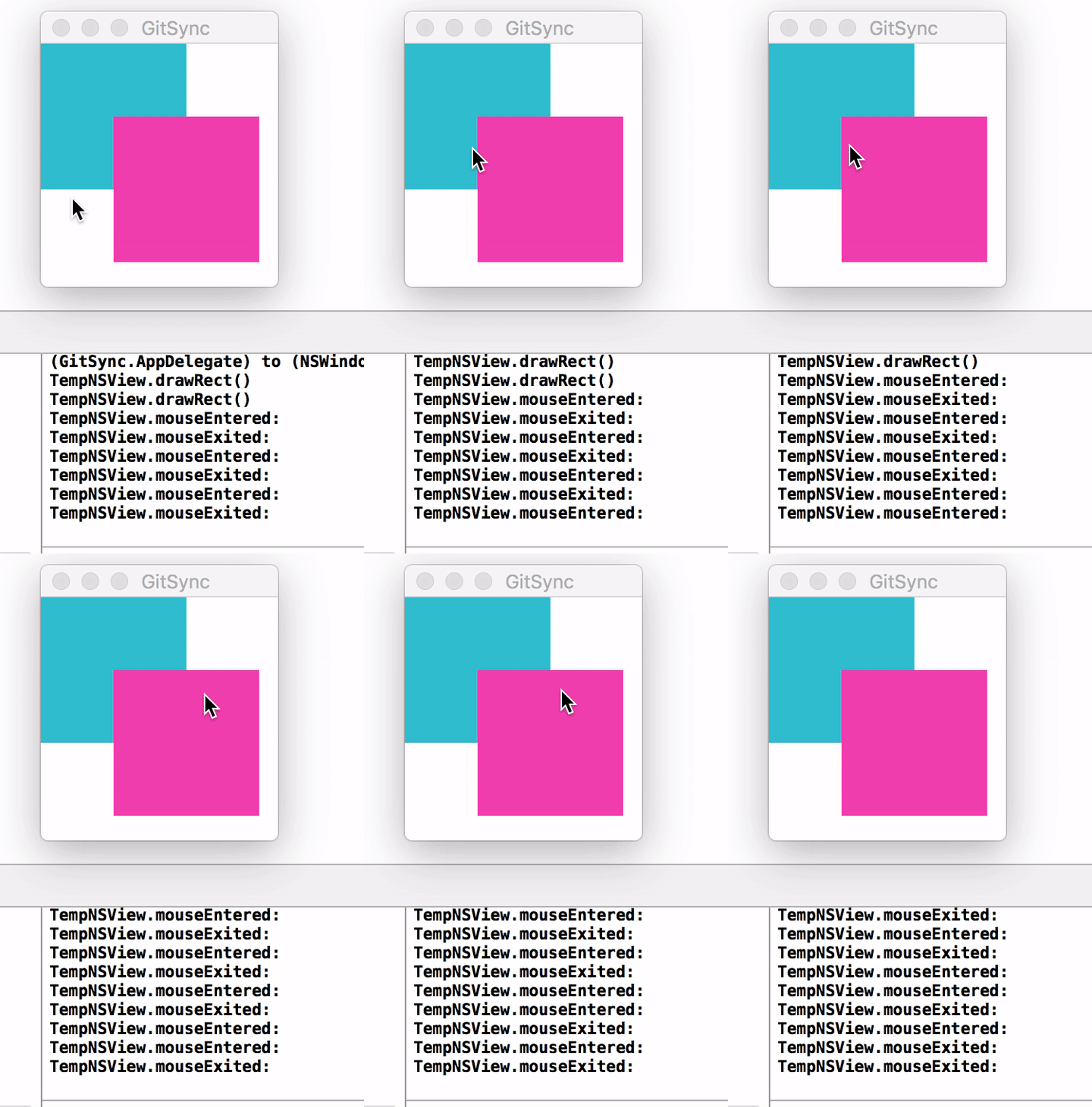
NOTE Overlapping NSTrackingArea’s are not working, so it seems you have to do mouse-tracking in a topmost nsview anyway, so then the CALayer-scheme is the only way to go.
NOTE: It seems apple struggles with clipping of layer-backed views them selfs. Namely with focus rings. So in lion they introduced the methods: focusRingMaskBounds, drawfocusRingMask, noteFocusRingMaskeChanged to mitigate this problem. Which seems convoluted to me, instead they could just fix the problem in the first place, Since dropshadow isn’t effected
Best Solution so far
So what if you do as the original Element code and have the stroke in a separate view of the fill view, then you align the stroke view according to your positing rules. And since outer dropshow can be applied to the layer it self nothing else needs to be offset. the drawback is that dropshadow gets separated into two places and the extra bit of overhead concerning the extra view for the line. All in all it may not pose that big of an issue. Do more research though but this seems to be a good solution to keep the boat going forward. This approach also lends it self to easily be interchanged with the “correct” solution. (one could also maybe add the outer shadow it self as layer, which is something quartz probably does anyway behind the scene, given how the frame plays such an important role in displaying things correctly) I really think this kind of composition is the way to go, its mentioned many places that composition is a good thing for optimization. So why not composite the stroke the fill and the shadow. ? you will need to test mouse behavior with this and also gestures i presume. when it comes to hit-testing it seems this can be done from any ca layer parent, and then you sort of return true or false from the sublayers if it was hit. this needs testing.
A new solution It seems by using CALayer you wont have access to NSTextViews spell checker etc. But the current way Element is implemented you acutaly use NSView, and overlapping is working, you only have a problem with the frame clipping. (check if sub layers are unclipped, because if they are then you may just offset the line and shadow etc as described in the best solution so far scenario)
- [ ] search for focus ring layer clip problem
- [ ] You might want to look at the code from DrawKit as well, since the problem of clipping may relate to struggles he had, see what he uses for hees views/layers
- [ ] look at that icon xcode tutorial that that guy who makes stream2me made. it may have clues to CALAyer tricks
- [ ] test if you can have a custom path and then add the outer shadow to the layer of that path, does the shadow fit the path? or is there a method that sets the shadow path?
- [ ] Make a simple test with CALayer with sublayers and a hit test that works among the layers. sending events up the hirearchy, and also blocking events midway etc
- [ ] Test gestures on this site: here you also have the pdf in your dropbox if the site goes away. Also see legacy code and research on this topic. Big nerd ranch book page: 582
NOTE Argument: One reason not to use Core Animation is the lack of any Accessibility support. Answere: It’s true that a built-in view like NSTableView or NSTextView has accessibility support that a custom view built from CALayers does not, but it’s mostly the same for a custom view whose entire contents is drawn directly into a graphics context. I think this is really more about implementing accessibility support in custom views in general.
You can add accessibility support to Core Animation-based user interfaces, and there was actually an entire session about this exact topic at WWDC 2007. I don’t remember offhand if there was one at WWDC 2008.
NOTE:
CAShapeLayer is great for animating between path states
CAGradientLayer
only supports linear gradients apparently (confirm this) and does it work for osx? (confirm this)
Updating sublayers Apparently you have to set the layercontentredrawpolacy to ….onsetneedsdisplay in order for sublayers to update correctly when using a custom layer hierarchy. see video at 47:02 session 217 layer backed views from apple
NOTE A good thing about using CALayers is that its almost cross platform from OSX to IOS (source: “6 coreanimation.mov”)
// This is the code to make an NSView a layer HOSTING view
 /*
 The view simply serves as a host for the layer
The layer can be manipulated, sublayers can be added, etc. (more flexibility in terms of Core Animation, but less flexibility when it comes to operating as a standard NSView)
You cannot draw into the view itself, all drawing has to be handled by the view's layer (and its sublayers)
 */
[view setLayer:[CALayer layer]];
[view setWantsLayer:YES];

// This is the code to make an NSView a layer BACKED view
/*
In a layer-backed view...

The contents of the view are just cached onto a backing CALayer
Enables you to use some of the Core Animation goodness with the NSView with no changes to the actual drawing code
You cannot manipulate the layer directly, it is owned entirely by the view itself
*/

[view setWantsLayer:YES];
- Layer-backed views does not refresh sublayers if the parent gets the display = true call
Idea 1 To solve the layer-backed view problem with clipping things drawn in CGContext by the frame, one could create an automatic padding and repositioning of the frame if needed. Say if you add -12px y.shadow, then offset the frame by -12px in the y dir. This is definitely not a great solution, but its there. Now investigate further.
Idea 2 Another solution would be to offset the frame only when dealing with the stroke. I.e outside, center strokes. and use layer properties for the outer shadow and regular CGContext drawing for the inner shadow. Which ,ay not complicate things that much since offseting a frame is more intune with how things were done in the old Element code.
- [x] Keep digging though. cast a wiiiidddeee research net on this one and keep writing things down that you find that may be usefull in the future
THIS IS KEY:
Unlike the single NSView design, layer-backed views are subclasses of NSResponder. Therefore, it is possible to accept mouse and keyboard input at a much lower level.
- [ ] Layer-Backed Views
- [ ] and watch the vids
Discussion: When adding animation to your applications, the following guidelines will help you choose the appropriate technology:
- For the portions of your user interface that only require static, non-rotated, Aqua controls, use Cocoa views.
- For the portions of your user interface that require simple animation of a view or window’s frame, consider using the animator proxy support provided by Cocoa views and windows.
- For the portions of your user interface that require the ability to display and interact with rotated Aqua controls, use layer-backed Cocoa views.
- If performance testing indicates that your custom view is processor or time intensive, consider using layer-backed Cocoa views. Remember that layer-backed views use more memory than non-layer-backed views.
- If your custom views requires extensive user events handling consider using layer-backed Cocoa views.
- For the portions of your user interface that have considerable graphics and animation requirements and does not rely on Aqua controls, consider using Core Animation layers directly. Using layers directly does require you to handle all user events (mouse and keyboard interaction) yourself by overriding the view that hosts the root layer.
- Core Animation layers, on the other hand, have the advantage of being computationally much lighter-weight than instances of Cocoa views. This allows you to create interfaces from smaller constituent parts when using Core Animation layers. This can also give Core Animation layers the edge when your application needs to display hierarchies consisting of thousands of layer objects.
Layer Advantages
- Layers support several visual properties that are not exposed in layer-backed views. For example, corner radius and borders.
- Sublayers can reside outside of a layer’s bounds.
- Layers support complex masking.
- Layers are computationally lightweight.
- Layers support complex transforms.
- Layout managers provide more flexible control over layer placement.
Layer-Backed Views
- Layer-backed views participate in the responder chain.
- Layer-backed views receive user events.
- Layer-backed views support drag and drop.
- Layer-backed views support accessibility.
- Layer-backed views support all the standard Aqua controls and views.
- Layer-backed views support scrolling.
- Layer -backed views support text input.
Common Capabilities
- Both layers and layer-backed views support a nested hierarchy model with parent-relative coordinate systems.
- Both layers and layer-backed views support cached contents that require no application interaction for damage redrawing.
- Both layers and layer-backed views support the full range of media types.
- Both layers and layer-backed views support overlapping of layers/views with other layers/views outside of the sublayer/subview.
apples own core anim overview
Discussion
I think what they mean here is that you can travel up the parent view stack from the NSView point of view. Wait a minute. Doesnt this also mean that all interaction code needs to reside in the Root NSView?, unless you can override hittest etc. Hmmm
Handle mouse event (click) in CALayer sublayers:
The GeekGameBoard sample app demonstrates this. Look in the BoardView class. link
Apple CALayer class reference: link